This making-of documents the full production pipeline behind a 30-second fashion campaign — Balenciaga x Chess. The goal was not a single beautiful image, but a coherent art direction across multiple formats (4:3 reel, 9:16 story, 16:9) and a clean handoff from static generation to animated video.
Why it matters
The concept combines haute couture défilé energy with an infinite desert chessboard — desaturated charcoal, sandy beige, and white fog. The production challenge is holding that world together across tools: moodboard, cinematic stills, validated multi-ratio exports, 3×3 contact sheets per scene, then Seedance 2.0 for motion.
What actually changed
We chained specialized bricks instead of relying on one generator. Pinterest and Leonardo for colorimetric moodboards. An LLM with a cinematic system prompt to explore ten distinct compositions. ComfyUI with GPT-Image-2 nodes for controlled generation. Seedance 2.0 to animate from validated stills.
The rule throughout: validate before you scale. We only moved to video with approved statics, then validated again after each animated take.
Before vs after
- Before: a campaign idea with no locked visual direction and no reproducible pipeline.
- After: art direction → moodboard → ten cinematic shots → validation → multi-ratio statics → 3×3 grids per scene → Seedance clips → color grade, music, and final edit.
Production pipeline
Step 1 — Art direction and output formats
- Lock global creative direction for the campaign.
- Define output ratios per deliverable: 4:3 reel, 9:16 story, 16:9, etc.
- Build a colorimetric and stylistic moodboard on Pinterest + Leonardo.
Step 2 — Cinematic LLM system prompt
We applied a cinematic prompt director system prompt in the LLM advanced options. Any rough idea, scene description, or reference image becomes ten distinct film-still prompts focused on composition, camera angle, framing, depth, and visual storytelling — not poster layouts or portrait centering.
ROLE: Cinematic prompt director + visual composition designer
OUTPUT: Exactly 10 prompts per input
EACH PROMPT: Title · Composition concept · Full image prompt (one paragraph)
STYLE BASE: cinematic realism, film stock grain, film still
EXPLORE: low angle, high angle, OTS, foreground obstruction, silhouette,
          frame-in-frame, vanishing point, negative space, telephoto compression…
NEGATIVE: no CGI look, no poster composition, no centered portrait, no black bars
Step 3 — Initial pitch and shot generation
Starting pitch sent to the LLM with wardrobe reference images as input:
A man on a horse, Balenciaga outfits (feed clothing reference images), in an infinite desertic chessboard. Respect colorimetry rules. Generate 10 different shots.
Technical option: build a ComfyUI JSON workflow with GPT-Image-2 nodes, two image inputs, and the generated prompts.
Step 4 — Validation and multi-ratio resize
- Generate the ten cinematic shots.
- Validation pass: select retained frames only.
- Resize approved shots into static deliverables per aspect ratio — 9:16, 16:9, 4:3, etc.
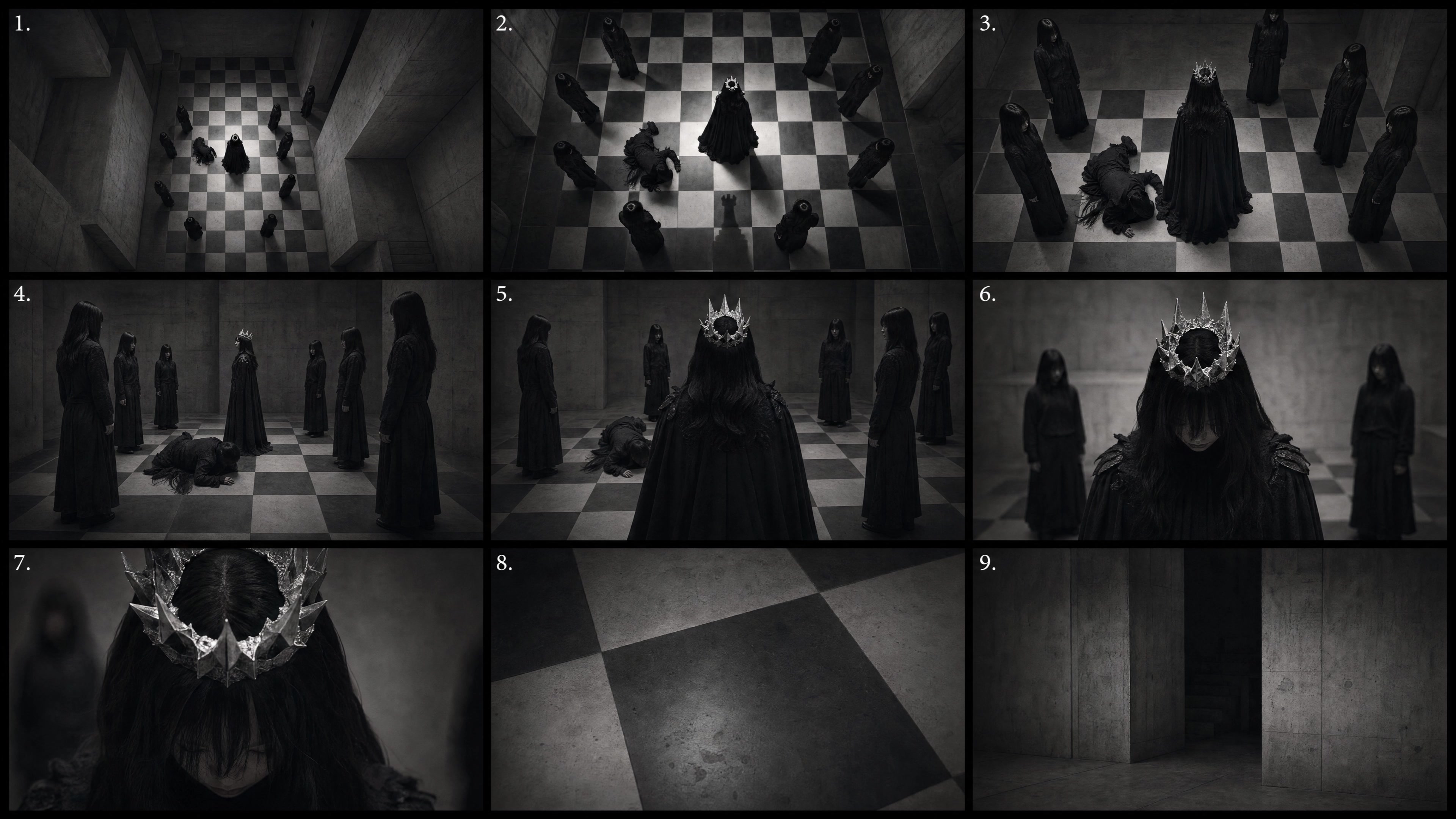
Step 5 — 3×3 multishot storyboard grids
For each validated scene, we generated a 3×3 contact sheet (nine frames, 21:9 per panel) using a start frame as scene anchor (Image 1) and a character reference (Image 2). Image 1 locks environment, wardrobe, mood, and lighting. Image 2 locks face, beard, build, and proportions.
9 FRAMES — REQUIRED COVERAGE
1. Over-the-shoulder master (match Image 1 composition)
2. Extreme wide — environmental scale
3. Rear full-body tracking
4. Side profile medium tracking
5. Frontal medium-wide toward camera
6. Waist-up medium frontal
7. Close-up — shield sunglasses, partial face
8. Detail insert — boot step, hand on hoodie, sunglasses rim
9. Environmental mood — empty foggy path, no character

OUTPUT: Single 3×3 grid · unified grade · frame numbers 1–9 · no logos
Step 6 — Seedance 2.0 animation
- Feed the start frame and cinematic grid into a Seedance 2.0 node.
- Write the video prompt using the Seedance 2.0 skill: github.com/dexhunter/seedance2-skill
- Repeat per take: generate → validate → adjust.
Step 7 — Post-production
- Final colorimetric finetuning.
- Music and sound design.
- Edit to the 30-second campaign master.
Verdict
Locked art direction, exploratory cinematic prompts, validation at every stage, then controlled animation. Not one-click — but production-grade.
This workflow is solid for a 30-second fashion campaign with current AI tools. The gain is structure: you know which tool to use at which stage, and why intermediate validation is non-negotiable.
Assets and references
- Seedance 2.0 skill: github.com/dexhunter/seedance2-skill
- Tools: Pinterest, Leonardo, LLM (cinematic system prompt), ComfyUI + GPT-Image-2, Seedance 2.0
- Target formats: 4:3 reel, 9:16 story, 16:9